|
|
msg88539 - (view) |
Author: Roger Serwy (roger.serwy) *  |
Date: 2009-05-29 21:09 |
I noticed that the feature to clear the shell window has been a
discussion topic in the IDLE-dev archives for a few years. Here's an
extension that can clear the contents of the shell window. It provides
"Clear Shell Window" under "Options" and a <Ctrl-L> key binding.

The source code provides two methods to do this. The
ModifiedUndoDelegator prevents changing the contents of the text widget
before "iomark". One solution is to disable the filter, make the
changes, then re-enable it. Another solution is move "iomark" to the
beginning of the document. Any thoughts?
|
|
msg89319 - (view) |
Author: Tal Einat (taleinat) * |
Date: 2009-06-13 10:26 |
First of all I think that the Squeezer (issue #1529353) extension is
more useful and solves most of the problems that this proposed feature
is set to solve, e.g. issue #1442493.


IMO the second method you offer - temporarily moving "iomark" - is
preferable.

One reason is that it will allow using the undo feature to undo deleting
the entire shell history. I think this is important since deleting the
history by accident without a way to retrieve it would be very annoying.

I propose going with the clear_window2 method, wrapping it with
undo_block_start() and undo_block_stop().
|
|
msg89387 - (view) |
Author: Roger Serwy (roger.serwy) * |
Date: 2009-06-15 05:13 |
I just tried Squeezer. It's pretty neat and it solves a different
problem. Clearing the contents of the shell window should be a simple
operation.

The undo operation doesn't restore iomark properly, nor does it restore
tags. I've uploaded a newer version of the extension to handle undo.

Binding to the "<<undo>>" virtual event with add="+" didn't work as
expected, so the new undo event handler explicitly calls the older one.
I admit that this code is not ideal.

Should I move this extension to the Cheese Shop and close out this issue?
|
|
msg185485 - (view) |
Author: Roger Serwy (roger.serwy) * |
Date: 2013-03-29 02:16 |
The ClearWindow.py extension as included in the IdleX package contains a more recent version that allows undo with full color tag restoration.
|
|
msg186033 - (view) |
Author: Roger Serwy (roger.serwy) * |
Date: 2013-04-04 13:46 |
In #17632, Raymond suggests adding a "Restart and Clear" menu item under the Shell menu.
|
|
msg211032 - (view) |
Author: Tal Einat (taleinat) * |
Date: 2014-02-11 22:43 |
Removing text before "iomark" can be done by using the underlying Text widget directly. See how the Squeezer extension does this in issue1529353. This should simplify the implementation significantly.


I also took a look at the version of the extension in IdleX. I'm thinking of adapting this for CPython's IDLE. Some questions:

1. Is there a reason that text.dump() isn't called inside ClearWindowDeleteCommand.do()?
2. What is the purpose of strip_ansi()?
3. Does IDLE support multi-line prompts, or is that just IdleX? As a side note, it seems that in IDLE the debugger will override the prompt with '>>> ' whenever it is shut down (see PyShell.close_debugger); perhaps this is a bug?
4. I see ClearWindowDeleteCommand just calls text.delete() and text.insert to modify text before the iomark. Will this work on regular IDLE as well, or this is possible only in IdleX?
|
|
msg211044 - (view) |
Author: Roger Serwy (roger.serwy) * |
Date: 2014-02-11 23:48 |
>
> Removing text before "iomark" can be done by using the underlying Text widget directly. See how the Squeezer extension does this in issue1529353. This should simplify the implementation significantly.

I agree that the underlying .delete can be called directly, bypassing
the ModifiedUndoDelegator in the percolator chain. I have mixed opinions
about the Percolator, but that's another issue.

>
> 1. Is there a reason that text.dump() isn't called inside ClearWindowDeleteCommand.do()?

There is no compelling reason. I agree that it should be moved to .do()

> 2. What is the purpose of strip_ansi()?

That's an artifact from earlier code for IPython compatibility. The
colored text prompts in IPython use ANSI escape codes, and the older
undo code reinserted the text without restoring tags.

Using text.dump() and the restore routine in undo() now restore the tags
and eliminates the need for strip_ansi(). I haven't removed that old
code yet.

> 3. Does IDLE support multi-line prompts, or is that just IdleX? As a side note, it seems that in IDLE the debugger will override the prompt with '>>> ' whenever it is shut down (see PyShell.close_debugger); perhaps this is a bug?

IDLE itself does support multi-line prompts. The debugger is a whole
other can of worms.

> 4. I see ClearWindowDeleteCommand just calls text.delete() and text.insert to modify text before the iomark. Will this work on regular IDLE as well, or this is possible only in IdleX?

It should work on regular IDLE. IdleX wraps the existing CPython IDLE.
|
|
msg211056 - (view) |
Author: Tal Einat (taleinat) * |
Date: 2014-02-12 06:11 |
Roger, thanks for the quick response!

I'll try to get to working on this in the coming days.
|
|
msg211066 - (view) |
Author: Tal Einat (taleinat) * |
Date: 2014-02-12 08:58 |
Terry, if I wrote an appropriate patch, would it have a chance of being accepted?
|
|
msg211067 - (view) |
Author: Terry J. Reedy (terry.reedy) * |
Date: 2014-02-12 09:40 |
Without having read the dialog to know what you mean by appropriate, and how a new patch would be different from Roger's 5 year old patch, or how this issue relates toSqueezer, yes. I have occasionally closed the shell and reopened (perhaps by running a file) to clear the shell. I would like to reduce the need for that by putting help output in a separate read-only output window. But there is still the occasional 2000 line traceback for hitting the recursion limit, and other mishaps.
|
|
msg211073 - (view) |
Author: Tal Einat (taleinat) * |
Date: 2014-02-12 09:57 |
The relation to Squeezer is that both of these can be useful when you've had a large amount of output written in the IDLE shell. I prefer Squeezer as a solution for this issue, for two reasons:

1. Squeezer catches long outputs before they are ever written in the Text widget, so the performance degradation doesn't happen at all. This also means that for truly huge outputs, Squeezer will still work, while otherwise IDLE may become completely stuck before a user would have a chance to clear the shell history.

2. Squeezer gives the user access to "squeezed" text in several ways: copy to the clipboard, open in an external viewer or expand into the shell. Otherwise the user must choose between a shell with some useless output hiding the useful history, or erasing the entire history.

Still, I still think clearing the history could be a useful feature, though. This is a common feature in terminals and it has been requested relatively often.

Note that making ClearWindow and Squeezer play together nicely is non-trivial. I'm likely going to have ClearWindow include special support for Squeezer.
|
|
msg211074 - (view) |
Author: Tal Einat (taleinat) * |
Date: 2014-02-12 09:58 |
Also, note that the new version of Squeezer allows squeezing tracebacks as well as normal output! It does not squeeze them automatically, though; the user must do so manually.
|
|
msg211310 - (view) |
Author: Tal Einat (taleinat) * |
Date: 2014-02-16 09:28 |
FYI, with some help from Roger answering various questions, I've cooked up a version of ClearWindow supporting the current version of IDLE. This includes integration with the Squeezer extension.

I haven't tested it, however, nor written appropriate tests. I hope to do so in the coming days, and when I have I'll post a patch.
|
|
msg211641 - (view) |
Author: Tal Einat (taleinat) * |
Date: 2014-02-19 18:47 |
Attaching a patch adding a ClearWindow extension for IDLE.

I took some ideas from Roger's version in IdleX, but I wrote this version from scratch and it is significantly different in many aspects.

This patch includes extensive tests with 98% coverage of ClearWindow.py.

This also includes a minor change to PyShell, adding a 'prompt' tag to every prompt in the shell's Text widget. This makes it straightforward for the ClearWindow extension to find the last prompt in the shell.
|
|
msg211642 - (view) |
Author: Tal Einat (taleinat) * |
Date: 2014-02-19 18:49 |
Attached another patch which adds support for the Squeezer extension to ClearWindow. This is necessary in case the Squeezer extension is added to IDLE.

This patch allows ClearWindow to properly remove "squeezed text" buttons created by Squeezer, and also reinsert them if the 'clear' operation is undone.

This patch also updates the relevant ClearWindow tests as well as adding new tests to check the new functionality.
|
|
msg211644 - (view) |
Author: Tal Einat (taleinat) * |
Date: 2014-02-19 18:51 |
Regarding the last patch, see issue1529353 which proposes adding the Squeezer IDLE extension (including patches).
|
|
msg211663 - (view) |
Author: Terry J. Reedy (terry.reedy) * |
Date: 2014-02-19 22:00 |
I have not looked Idle issues in the last few days because I am working on the unmaintained (since 2006 and 8), embarrassing (~5 bugs in 70 lines), disfunctional mess that tokenize.untokenize has been. It will take me a few more days to finish.

Clearing the shell window strikes me as an obvious beginner feature. From what I have read here, Squeezer strikes me as the sort of advanced feature that you and others have suggested should not be added. I might change my mind after trying it out. I must admit that switching from a half gigabyte 32-bit xp machine to a multi-gigabyte 64-bit win7 machine a couple of years ago seems to have eliminated large output slowdown. Or maybe tk has improved. Either way, not having the problem Squeezer solves probably colors my thinking.

So *at the moment* I would be inclined to apply a more or less Squeezer-ignorant patch like ClearWindow-extension and then revise Squeezer to replace methods as necessary when it is installed.
|
|
msg212020 - (view) |
Author: Tal Einat (taleinat) * |
Date: 2014-02-23 18:51 |
Terry, please do give Squeezer a try before making a decision! Squeezer may be slightly more complex than ClearWindow in concept and in code, but IMO it is simpler and more appropriate for use by a novice user.

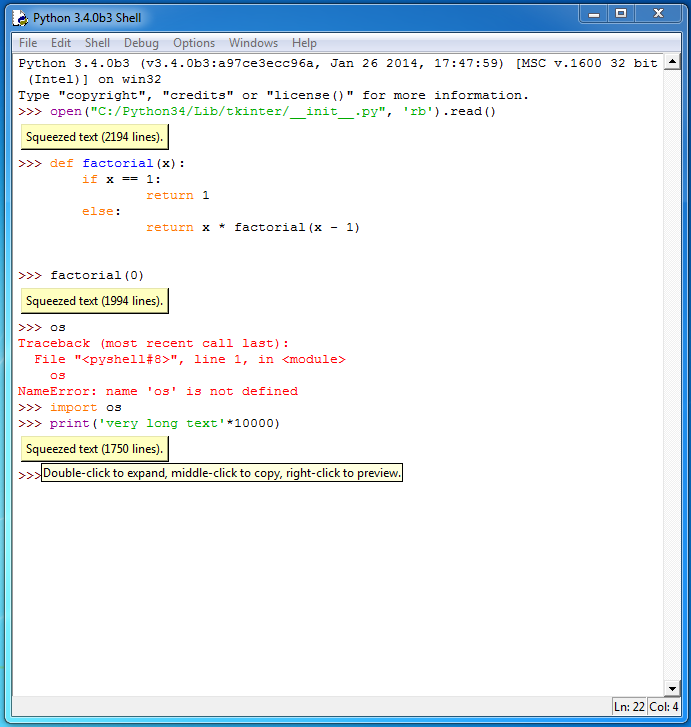
I'm attaching a screenshot to give a feeling of what working in the IDLE shell with Squeezer looks like. This screenshot was taken on Windows. Note that the second squeezed text is the very long "Max recursion depth" exception traceback, which I manually squeezed after it was printed.

Now I'll try to make the case for Squeezer one last time...


Nobody expects a Squeezer Inquisition! Amongst Squeezer's weaponry are such diverse elements as:

1. No fear! Squeezer automatically catches overly long outputs for users, so they need not fear crashing IDLE or losing their history just by printing something long accidentally.

2. No surprise! Squeezer requires no learning and is completely self-explanatory. It's an in-line button with a label of the form "Squeezed text (13412 lines)". Hovering over it with the mouse shows tooltip listing the various available interactions (expand, copy, preview). Don't want the text to be squeezed? Double-click and the button is replaced by the original text!

3. Ruthless efficiency! With Squeezer, IDLE will never slow down to a crawl again! (Well, unless you explicitly expand a very long output.)

4. Dashing red uniforms! Okay, not really, but it does look nice.

Also, beware *the comfy chair*! Squeezer conveniently allows one to manually squeeze exception tracebacks and other outputs to clean up the shell history. This is available via the right-click context menu.


Finally, I'll mention that ClearWindow forces a user to choose: delete your entire shell history, or keep it all. Squeezer allows a user to choose which parts to hide and which to keep, and nothing is ever lost since squeezed text can always be expanded again.

That's it. If this doesn't convince people of the utility of Squeezer, I truly believe nothing else will.
|
|
msg212051 - (view) |
Author: Terry J. Reedy (terry.reedy) * |
Date: 2014-02-24 00:41 |
OK, I will.
|
|
msg260912 - (view) |
Author: Terry J. Reedy (terry.reedy) * |
Date: 2016-02-27 01:09 |
This issue is lower priority to me than many others, but there does seem to be at least some demand shown on Stackoverflow. So I have not dismissed it completely.
|
|
msg272835 - (view) |
Author: Terry J. Reedy (terry.reedy) * |
Date: 2016-08-16 05:11 |
Python 3.6 just got a patch to squeeze duplicate traceback lines, as with recursion-depth errors.
|
|
msg272843 - (view) |
Author: Terry J. Reedy (terry.reedy) * |
Date: 2016-08-16 07:06 |
Comments on taleinat.20140219.IDLE_ClearWindow_extension.patch.

In 3.6, module names are lowercase, not too long.  Also, I am trying to consolidate small files, not multiply them.

I am trying to convert existing built-in extensions to built-in features, not add new extension files.

The options menu seems like a strange place for the menu item.  Since this patch is for Shell, I would put it on the Shell menu.  Select All == Control A (Edit menu) + Backspace or Delete clears editor and output windows. (I could add this to the doc.)  The issue with Shell, as Roger noted in his original post, is the current mechanism to prevent deletion.

This suggests an alternate solution: only protect the current prompt (which I would like to move to a sidebar anyway).  There could be an option to making Shell history editable or not?  Why should people have to save-load or copy-paste to edit a shell session?  (Currently, the Rt click context menu displays an apparently active 'Cut' that does not work.)  The main issue is that people might edit past input, hit return, and expect the code to run.  This could be made to work.

What to delete?  Everything prior to last prompt is plausible when IDLE is paused waiting for code input.  It is wrong if one is trying to stop output since the last prompt.  These are two different use cases (Raymond mentioned both in duplicate #27771).

1. Cosmetic cleanup of a long session.  A Shell => Clear (everything) and Restart (and emit a new prompt) would work for this.

2. Recovery from excessively many or long lines.  (see #27750, for instance).  For this, one may only want to delete the most recent program output (and ignore anything that keeps coming before the next prompt is printed).  The need here is for Shell to remain more responsive than it currently does.

Undo-able?  Cntl-A + delete is already undo-able.  Clear and Restart would be, as Restart clears the undo stack.  I think emergency deletion should not be.
|
|
msg287735 - (view) |
Author: Alex (Alex) |
Date: 2017-02-14 05:40 |
The ClearWindow.py extension works well with the specified shortcut, How can i invoke it in my source code to clear the window ? Thanks in advance.
|
|
msg287791 - (view) |
Author: Terry J. Reedy (terry.reedy) * |
Date: 2017-02-14 18:55 |
Alwx, please do not change the headers. IDLE menu commands cannot be invoked from a program.
|
|
msg319869 - (view) |
Author: Terry J. Reedy (terry.reedy) * |
Date: 2018-06-18 08:03 |
The way to clear an editor window at least on Windows is ^A (select all) and delete, which can be any of BS (backspace) or DEL or ^X (Cut).  The latter 'moves to the clipboard.  In Shell, select all selects everything, but ^X enters '^x', the other 2 do their normal thing.  All three unselect without deleting.

My first inclination is to have any or all of these work by ignoring IDLE's protection mechanism, which is different from tk's no-write mode.  After deleting, the prompts needs to be re-written.  I understand that Cut would need to expand squeezed blocks to the clipboard.
|
|
msg333251 - (view) |
Author: Terry J. Reedy (terry.reedy) * |
Date: 2019-01-08 21:11 |
An SO question today got me to look more at SO questions and discussion, and this appears to be the most requested feature.

https://stackoverflow.com/questions/1432480/any-way-to-clear-pythons-idle-window - 2009, 129 upvotes, 32 answers (not all read yet)

... (15 other hits for [python-idle] clear screen)

https://stackoverflow.com/questions/54083355/how-to-clear-the-screen-in-idle-on-imac - 2019 today

So I want to revisit this after we do a bit more on squeezer.  I want to add 'Clear and Restart' to the Shell menu, as Raymond suggested, so I am inclined to 'clear and restart' this discussion by closing this issue and reopening #17632 as a followup.
|
|
msg359256 - (view) |
Author: Terry J. Reedy (terry.reedy) * |
Date: 2020-01-03 21:24 |
#17632 was instead closed as a duplicate of this issue.

The (editor) Run menu now has a custom run item.  'Clear shell before restart' could be added as an alternative to 'no restart'.  But this would be a separate issue.
|
|
msg359265 - (view) |
Author: (ThePokestarFan) * |
Date: 2020-01-04 00:10 |
I would really like to be able to clear IDLE when using it. I do not understand how hard it can be just to clear a window.
|
|
msg374596 - (view) |
Author: Zackery Spytz (ZackerySpytz) *  |
Date: 2020-07-30 04:21 |
I have created PR 21682 to add a "Clear and Restart" item to the "Shell" menu.
|
|
msg374626 - (view) |
Author: Terry J. Reedy (terry.reedy) * |
Date: 2020-07-31 00:54 |
@Pokerstar: First we have to agree on several things.

1. What is the need, what are the use cases? When do *you* feel a need to clear the shell?

2. What is the basic strategy?
 a. Delete selections: make delete, backspace, and cut work in the shell, as in editor.
    I prefer this.  No new doc or menu entries needed.
    People can delele less than everything.
 b. New feature. All or nothing.  Changes 8 files.  There was discussin of how to delete, but seems not difficult.

3. Details need to be agreed on.
  If new feature, menu entry and shortcut: I thing 'Clear shell' is enough.  Patch disagrees with discussion on shortcut.
  Should header be deleted or left?  (Delete selection lets user decide.)
  Should deleted text be undoable?  We do not currently allow any editing of shell history?  Undo amounts to pasting or retyping, and if we do not allow pasting or typing in general, why with undo?
  Should squeezes text be expanded?  I think not.  help(tkinter) produces over 22000 lines.
  Should the current prompt and any code be deleted?  I think not.  If prompt gets deleted, it has to be re-written, but without current in-process entry.
  Should remote process be restarted?  Why?  This can easily be done independently and might not be wanted.
  <probably something else>

4. New behavior must be tested.  The is usually the hardest part of a patch, which is why it is neglected.  Incomplete testing may result in adding a new bug.  It was just reported that closing IDLE while the Shell is waiting for a response to input(prompt) leads to incomplete shutdown and a zombie process.  On macOS, this can lead to a crash and possibly a need to reboot.
  So, should we allow clearing, deletion while user code is executing?  While user code is requesting input?  Or must we prohibit?  I don't know, other than this must be tested at least on Windows and macOS.

Overall, I prefer to use the deletion mechanism we have, rather than add a new one.
|
|
msg414323 - (view) |
Author: Terry J. Reedy (terry.reedy) * |
Date: 2022-03-02 03:49 |
https://stackoverflow.com/questions/71290382/how-do-i-adjust-python-idle-shell-settings-so-that-the-next-line-of-code-i-type
is from someone who, for whatever reason, likes having blank space in the shell below the input prompt.  It is not clear whether deleting lines to make that happen would be satisfactory, or if all lines must be accessible.
|
|
| Date |
User |
Action |
Args |
| 2022-04-11 14:56:49 | admin | set | github: 50393 |
| 2022-03-02 03:49:24 | terry.reedy | set | messages:
+ msg414323
versions:
+ Python 3.11, - Python 3.7, Python 3.8 |
| 2020-07-31 00:54:24 | terry.reedy | set | messages:
+ msg374626 |
| 2020-07-30 04:21:22 | ZackerySpytz | set | messages:
+ msg374596 |
| 2020-07-30 04:12:39 | ZackerySpytz | set | nosy:
+ ZackerySpytz
pull_requests:
+ pull_request20826
stage: needs patch -> patch review |
| 2020-05-25 13:53:13 | terry.reedy | link | issue40765 superseder |
| 2020-01-04 00:10:30 | ThePokestarFan | set | nosy:
+ ThePokestarFan
messages:
+ msg359265
|
| 2020-01-03 22:16:03 | terry.reedy | link | issue39141 superseder |
| 2020-01-03 21:24:18 | terry.reedy | set | messages:
+ msg359256
title: IDLE - an extension to clear the shell window -> IDLE - clear and restart the shell window |
| 2019-01-08 21:11:48 | terry.reedy | set | type: behavior -> enhancement
messages:
+ msg333251
versions:
+ Python 3.8, - Python 3.6 |
| 2018-06-18 08:03:25 | terry.reedy | set | messages:
+ msg319869 |
| 2017-09-28 07:00:26 | taleinat | set | nosy:
- taleinat
|
| 2017-02-14 18:55:36 | terry.reedy | set | type: resource usage -> behavior
messages:
+ msg287791
versions:
+ Python 3.6, Python 3.7, - Python 2.7 |
| 2017-02-14 05:40:40 | Alex | set | versions:
+ Python 2.7, - Python 3.6
nosy:
+ Alex
messages:
+ msg287735
type: enhancement -> resource usage |
| 2016-08-17 01:36:15 | martin.panter | set | nosy:
- martin.panter
|
| 2016-08-16 07:06:29 | terry.reedy | set | assignee: roger.serwy -> terry.reedy
stage: needs patch
messages:
+ msg272843
versions:
+ Python 3.6, - Python 2.7, Python 3.3, Python 3.4 |
| 2016-08-16 05:19:33 | terry.reedy | link | issue27771 superseder |
| 2016-08-16 05:11:20 | terry.reedy | set | messages:
+ msg272835 |
| 2016-02-27 01:09:57 | terry.reedy | set | messages:
+ msg260912 |
| 2015-05-01 11:56:33 | THRlWiTi | set | nosy:
+ THRlWiTi
|
| 2014-02-24 00:41:40 | terry.reedy | set | messages:
+ msg212051 |
| 2014-02-23 18:51:12 | taleinat | set | files:
+ Squeezer Screenshot.PNG
messages:
+ msg212020 |
| 2014-02-19 22:00:23 | terry.reedy | set | messages:
+ msg211663 |
| 2014-02-19 18:51:18 | taleinat | set | messages:
+ msg211644 |
| 2014-02-19 18:49:40 | taleinat | set | files:
+ taleinat.20140219.IDLE_ClearWindow_Squeezer_integration.patch
messages:
+ msg211642 |
| 2014-02-19 18:47:02 | taleinat | set | files:
+ taleinat.20140219.IDLE_ClearWindow_extension.patch
keywords:
+ patch
messages:
+ msg211641
|
| 2014-02-16 09:28:29 | taleinat | set | messages:
+ msg211310 |
| 2014-02-16 06:35:50 | Todd.Rovito | set | nosy:
+ Todd.Rovito
|
| 2014-02-12 09:58:23 | taleinat | set | messages:
+ msg211074 |
| 2014-02-12 09:57:04 | taleinat | set | messages:
+ msg211073 |
| 2014-02-12 09:40:01 | terry.reedy | set | messages:
+ msg211067
versions:
- Python 3.2 |
| 2014-02-12 08:58:06 | taleinat | set | messages:
+ msg211066 |
| 2014-02-12 08:57:21 | taleinat | set | nosy:
+ terry.reedy
|
| 2014-02-12 06:11:56 | taleinat | set | messages:
+ msg211056 |
| 2014-02-11 23:48:03 | roger.serwy | set | messages:
+ msg211044 |
| 2014-02-11 22:43:11 | taleinat | set | nosy:
+ taleinat
messages:
+ msg211032
|
| 2014-02-04 12:02:47 | taleinat | set | nosy:
- taleinat
|
| 2013-12-10 01:40:40 | martin.panter | set | nosy:
+ martin.panter
|
| 2013-04-04 13:46:38 | roger.serwy | set | nosy:
+ rhettinger
messages:
+ msg186033
|
| 2013-04-04 13:45:43 | roger.serwy | link | issue17632 superseder |
| 2013-03-29 02:16:13 | roger.serwy | set | assignee: roger.serwy
messages:
+ msg185485
versions:
+ Python 2.7, Python 3.3, Python 3.4 |
| 2010-08-03 21:11:45 | terry.reedy | set | type: behavior -> enhancement
versions:
- Python 2.6, Python 2.5, Python 3.0, Python 3.1, Python 2.7 |
| 2009-06-15 05:13:28 | roger.serwy | set | files:
+ ClearWindow.py
messages:
+ msg89387 |
| 2009-06-13 10:26:18 | taleinat | set | nosy:
+ taleinat
messages:
+ msg89319
|
| 2009-05-29 21:09:50 | roger.serwy | create | |

 ➜
➜